• Home
  • About
  • Blog
  • Training
  • Books
  • Contact
    • Email
    • Facebook
    • Twitter
    • RSS

Practical 365

  • Office 365
  • Exchange 2019
  • Exchange 2016
  • Exchange 2013
  • Hybrid
  • Certificates
  • PowerShell
  • Migration

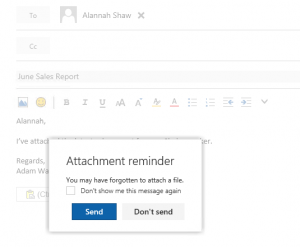
How to Restore the Forgotten Attachment Warning in Outlook on the Web

July 7, 2016 by Paul Cunningham 1 Comment

How to Restore the Forgotten Attachment Warning in Outlook on the Web

How to restore the forgotten attachment warning for Outlook on the Web users in Exchange Server and Exchange Online.

0 Shares

Exchange Server Exchange Online, Exchange Server, Outlook on the Web, OWA

Recent Articles

  • How attackers bypass third-party mail filtering to Office 365
  • SharePoint 365 and Azure integration – Using Azure Monitor to retrieve and analyze telemetry
  • Create custom reports using the updated Teams PowerShell module
  • Privileged Access Management – Part Two
  • Should you upgrade to Exchange Server 2019?
Practical 365

Popular Articles

Managing Change in Office 365Managing Change in Office 365

Training Courses

  • Configuring and Managing Office 365 Security
  • Office 365 Admin Playbook
  • Exchange 2016 Exam 70-345
  • Managing Exchange Mailboxes and Distribution Groups in PowerShell
  • More Training Courses...

Recommended Resources

  • Office 365 Security Resources
  • Office 365 Books
  • Exchange Server Books
  • Exchange Server Migrations
  • Exchange Analyzer
  • Digicert SSL Certificates

About This Site

Practical 365 is a leading site for Office 365 and Exchange Server news, tips and tutorials. Read more...
  • Email
  • Facebook
  • Twitter
  • RSS

Copyright © 2018 Quadrotech Solutions AG · Disclosure · Privacy Policy
Alpenstrasse 15, 6304 Zug, Switzerland

We are an Authorized DigiCert™ SSL Partner.
