

Resource mailboxes have been around for a few versions of Exchange Server, and Exchange Server 2013 brings us a few improvements in how they are managed.
There are two types of resource mailboxes:
- Room mailboxes are for fixed locations such as meeting rooms or conference facilities
- Equipment mailboxes are for items that are not fixed to a location, such as laptops or vehicles
Exchange 2013 puts resource mailboxes under their own section of the Exchange Administration Center. Both room and equipment mailboxes are managed in this same section.
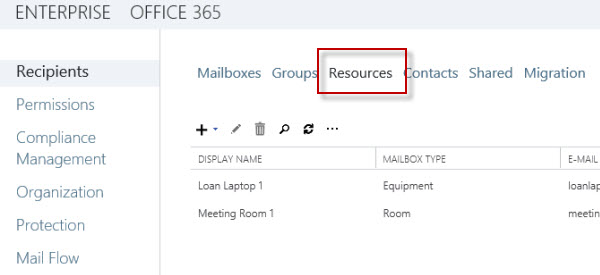
One of the immediate improvements is that you are able to set the booking policy or assign delegates during the creation of the resource mailbox, rather than as a secondary task after the mailbox is created.

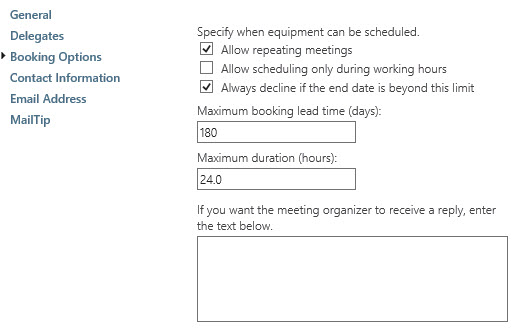
After the mailbox has been created there are a few additional properties you can customize. The booking options can be further tuned with regards to recurring meetings, booking horizon, and custom replies.
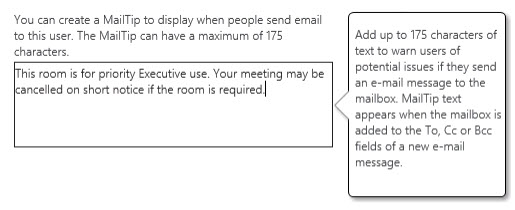
You can also easily configure a MailTip for the resource mailbox.
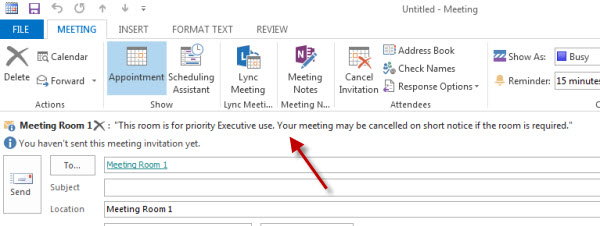
The text that you place in the MailTip will appear automatically when people add the room or resource mailbox to a meeting request in Outlook. Although in my opinion the MailTip needs some color to draw the person’s attention to it.
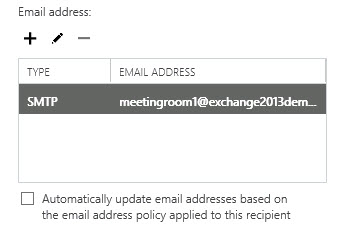
Finally, an interesting default setting is the disabling of email address policies. This does make sense as most resource mailboxes are for internal use only, so having email address policies assigning multiple SMTP addresses to resource mailboxes is usually not necessary.
Overall it appears that room and resource mailboxes are a feature that has matured over the previous versions of Exchange Server and now receive just a few minor improvements to make them simpler to manage.




HI Paul, I realize this is older post but.. I do have a plural sight account.
We are running Exchange 2013 with resource room booking, I would like to use a template to reply to room requests with procedures and attachments, is this possible with Exchnage 2013?
Hello,
We have Exchange 2016 and some users that has there email forwarding to a sharedmailbox (“Team box”).
When one of this users receive a meeting invitation on a room, this meeting appear in the room’s calendar and the sharedmailbox’s calendar.
Is there a way that the meeting appear in the room’s calendar and the user’s calendar.
Thanks in advance.
Regards,
Taoufik.
Hi,
we Use Exchange 2016 onpremise and would like to use an equipment mailbox to book our homeoffice notebooks. The calender works great but we dont get notifications. how we can do this?
It is an autoreply mailbox and we can set reminder in OWA for this mailbox but it doesnt work. Default reminder ist set to 1hour. But if we look into the calender item ther no reminder set.
Hve you an idea how it works?
Hello Paul or anybody else that can help,
I have two mbx rooms and we need to configure them in the way that a specific user receive an email notification every time someone add an event to its calendars.
Is that possible? Thank you in advance!
How do we apply a specific sharing policy to room mailboxes? We might like to have a more or a less restrictive sharing than is allowed for regular users. I created a ConfRmSharing policy….but the web-UI does not present an option to choose sharing policies (although it does from User mailboxes). If we find a PS way to do it, will the policy actually work?
Hi,
I already have delegates to approve/reject requests, but I also want to limit the calendar to a small number of users that may see the room and send booking requests. How is this possible?
Thanks!
Hi All,
Is there a technical difference between the Room Mailbox and Equipment Mailbox?
I checked and find out all the attribute are the same.
Any idea on this?
Paul, did something change in Exchange 2016 regarding the Rooms button in Outlook when scheduling a meeting? It makes a GC call every time it’s clicked, instead of finding the rooms in the OAB. We didn’t have this issue in Exchange 2010, and it’s driving us nuts. The GC call times out and displays a partial list of rooms, but if you click Rooms a second time, it immediately displays all the rooms?
Any ideas on this?
Hi Paul,
Is there any option to say that “Your Conference room is booked” instead of getting the default message that “delegate has accepted the meeting on behalf of room mailbox”?
I miss the tab “Resource In-Policy Requests” found in EMC for Exchange 2010. Microsoft should have implemented it in Exchange 2016 EAC as well in my opinion. In large organizations it is crucial to be able to restrict the booking of certain rooms and equipment in an easy way. You can’t expect a Helpdesk to run Powershell commands in order to fix this.
Great post! Have nice day ! 🙂 jeoul
Hi Paul,
How can we delete more than 24 hour resource meeting from exchange 2013 OWA ?
Thanks
Gurjot
Not sure I understand your question, but anyone who is a delegate of the resource mailbox or who has owner permissions for the calendar should be able to just delete it.
Hi Paul,
We run Exchange 2010 and have about 8 RoomMailboxes setup. Management is for staff at the Hospitality desk only, so Delegation is set. (No other users making any bookings directly) The Desk would like to use standardized (color)categories to manage the status or use of the rooms a bit better and provide some visual aid when multiple calendars are opened in Outlook. We need 5-8 categories of color and name. Currently they use colors, but cannot rename the tags or labels on the boxes themselves.
Currently I have an permission or rights issue: Even if I set the ‘Full-Access permission’ on the box the staff is unable to rename existing Categories in the boxes. Creating a new seems possible, but we would like to use the existing cat’s on the calendar items. We have about 2 years worth of scheduled appointments both future and history that we want to keep. Do you have any advise on the minimum rights required to make changes to the labels?
thank you in advance!
This Q&A-list really helps in finding clever ways to use Exchange!
Hi Paul,
Totally understand your question. But, it is what it is. I am just trying to figure a way. I got a PS command to get it done. So, just sharing it here. It may benefit someone.
Set-Mailbox -Identity “fromMailbox” -DeliverToMailboxAndForward $true -ForwardingSMTPAddress “recepientMailBox”
Thanks,
Saura Tripathy
Good write up. Plain and simple in setting up a resource.
We recently migrated from Exchange 2007 to Exchange 2013. With that, I had the task of migrating calendars from Public Folders to Calendars in the Resources tab. Fairly simple.
A user mentioned to me that in Public Folders, an organizer would create a “New Appointment” and invite Attendees and when they responded, the organizer would receive an email of their response. This doesn’t seem to occur in Resource Calendars. Is there a configuration that allows responses back to an organizer? (The organizer is not attending the meeting)
Hi Paul,
Would there be a way to forward the emails received by a Resource mailbox to another mailbox? I am trying to check this option in Exchange 2013. In Exchange 2007, I could see Delivery Option under mailbox properties but not in Exchange 2013, for Resource mailbox.
I am aware that we could easily set a rule in Outlook for mail forwarding. But I tried it as well by taking the ownership of the Resource mailbox. It just does not work. Any help would be really great.
Thanks,
Saura
Why do you need to do that?
Thanks for reply. We got users at Director level who do not want to check multiple mailboxes and want the emails to get forwarded. So, they have asked to set a rule for auto-forward of emails to their mailboxes and the original mail resides in the Resource mailbox. I could do that with Exchange 2007 Delivery Options. But, I am unable to see that in Exchange 2013.
Regards,
Saura
I don’t understand the scenario. Why are Directors checking multiple mailboxes in the first place?
OK, there is a mailbox for themselves and then other shared mailbox for the team and another shared mailbox for business reports etc etc. This is how the setup is. So, the additional mailboxes are configured in Outlook in the normal way.
Mailboxes shows below each other. But, people need to expand the mailboxes to see the folders and then the sub-folders. It sometimes becomes confusing with multiple mailboxes and lot of scrolling up and down. Hence, I think the request was made for an auto-forward of the mails. So, all the information can be seen in the same mailbox and no more scrolling up and down.
Hope, I am making sense.
Regards,
Saura
Why not just add the important folders to their Outlook favorites, so they can easily see and access them when needed?
It makes no sense to me to have all those separate mailboxes if all you’re going to do is forward emails into their inboxes anyway.
Hi Paul,
I’m an IT administrator and I would like to create a few equipment mailboxes for loaner laptops. How can I configure automated email reminders for both the borrower and myself so as to ensure the laptop is returned on time?
That is unfortunately not a feature of equipment mailboxes. You might need to look at a more feature-rich equipment booking/management system.
Hello Paul,
My resource mailbox stops sending notifications to users, this has caused lots of clashes between different. It has been sending before but suddenly stops.
Please any head way?
Hi! Great article of the Office 2013 room mailbox. I have an urgent question for the auto-respond email of the room mailbox. Can I add additional email recipient for every auto-respond email of the room mailbox when it was approved or rejected automatically from the Exchange server? Kindly, please reply soon.
Thank you very much.
Best regards,
Roy tan
Email: roy.tan@hotmail.com
Hi Paul
When publishing a resource mailbox calendar to our external clients, they can view the diary but are unable to add appointments, despite Default and Anonymous having Pub Editor rights. Any ideas? Would a regular mailbox work better in this case than a resource?
Hi Paul,
We have equipment mailboxes we are thinking to users can book the equipment but it should not be updated in user’s calendar. why we are thinking is, some user is booking equipment for more than 2 weeks, the user calendar shows 2 weeks busy.
Is there a way in exchange 2013 server to configure when user book the equipment it should be updated in equipment mailbox calendar but not in user calendar?
Perhaps they could change the appointment in their calendar to show as Available instead of Busy?
Pingback: [2016-New] 70-341 Exam Dumps Questions New Updated By Microsoft Official Exam Center (86-105) | 100% Pass IT Exam By Training GreatExam New VCE And PDF Dumps
Pingback: [2016-New] Easily Pass 70-341 Exam By Training GreatExam Latest VCE Dumps (86-105) | New Released Exam Dumps Free Download In GreatExam
Pingback: [2016-New] 70-341 Practice Tests 70-341 Questions And Answers Free Download In GreatExam (86-105) | 100% Valid Exam Dumps on Greatexam
Pingback: [2016-New] Easily Pass 70-341 Exam With GreatExam New 70-341 VCE And PDF Dumps (86-105) | 100% Pass IT Exam By Training GreatExam New VCE And PDF Dumps
Pingback: [2016-New] Easily Pass 70-341 Exam By Training GreatExam New Microsoft Practice Materials VCE Dumps (86-105) | 100% Free GreatExam Practice Test Download
Pingback: [2016-New] Dumps For Exam 70-341 With New Updated Exam Questions (86-105) | New GreatExam PDF And VCE Ensure IT Exam Pass 100%
Pingback: [2016-New] Best GreatExam Microsoft 70-341 PDF Dumps With New Update Exam Questions (86-105) | GreatExam New Updated IT Exam Questions
Pingback: [2016-New] 70-341 Exam Dumps Free Download In GreatExam 100% 70-341 Real Questions (86-105) | 100% Free GreatExam Exam Dumps Download
Hi Paul, I’m running Exchange 2013 and Outlook 2013/2016.
When I create equipment resource for my conference line, GoToMeeting, Laptops, etc. in Exchange, I cant see them in the Scheduling Assistant in Outlook. I would have to create all of my resources as rooms to show up in scheduling or contact list. is this normal or am I doing something wrong?
Thank you.
They will show up in the GAL (assuming the GAL hasn’t been modified to hide them) but you might need to wait for your Outlook client to get an updated offline address book first.
You can test it in OWA if you can’t wait for the OAB to update.
Hello Paul, is it possible to change a meeting room to equipment or do I have to re-create the mailbox?
Set-Mailbox has a -Type parameter that you can use to change a mailbox to a Regular, Shared, Room, or Equipment mailbox.
We still want to use auto acceptance for that equipment mailbox and planning to forward that schedule and requester information to the another mailbox.
Hi Paul,
Scenario is, when the user boo one of the equipment, it needs to send another mailbox ( with the schedule and the requester) to another mailbox (this is the shared mailbox for one group), the group will get the info and make the equipment ready when the requester to ask for that equipment.
Hope this explains. can it be possible in exchange 2013?
There’s nothing native in the calendar processing for that. You might be able to use a transport rule that triggers when the acceptance is sent by that mailbox. Otherwise it would need to be an EWS script or a custom room management system that integrates with Exchange.
I’m struggling with an issue where a room seems to have accepted a double-booking. The second person who booked the room did get declines for some conflicting instances, but not all, and the free/busy for the room mailbox shows both meetings. We are running both Exchange 2007 and 2013, but all room mailboxes were created in 2013. Any ideas?
[PS] C:\>Get-CalendarProcessing on2m | fl
RunspaceId : c992b7f3-0ef7-4713-887e-ab562f58c3a9
AutomateProcessing : AutoAccept
AllowConflicts : False
BookingWindowInDays : 1080
MaximumDurationInMinutes : 0
AllowRecurringMeetings : True
EnforceSchedulingHorizon : False
ScheduleOnlyDuringWorkHours : False
ConflictPercentageAllowed : 50
MaximumConflictInstances : 100
ForwardRequestsToDelegates : True
DeleteAttachments : True
DeleteComments : True
RemovePrivateProperty : True
DeleteSubject : True
AddOrganizerToSubject : True
DeleteNonCalendarItems : True
TentativePendingApproval : True
EnableResponseDetails : True
OrganizerInfo : True
ResourceDelegates : {}
RequestOutOfPolicy : {}
AllRequestOutOfPolicy : False
BookInPolicy : {}
AllBookInPolicy : True
RequestInPolicy : {}
AllRequestInPolicy : False
AddAdditionalResponse : True
AdditionalResponse : xxx
RemoveOldMeetingMessages : True
AddNewRequestsTentatively : True
ProcessExternalMeetingMessages : False
RemoveForwardedMeetingNotifications : False
MailboxOwnerId : frna.com/Users/on2M
Identity : xxx/on2M
IsValid : True
ObjectState : Changed
Can we send resource mailbox acceptance email to another mailbox?
I don’t understand your scenario. What/why are you trying to do ….that?
Paul, great article, very useful information. What would be a good way to create a shared calendar that users could invite when they setup appointments? For e.g. a company wide calendar that is mainly used for events such as All staff meetings etc. This shared calendar would always be Free and should allow for double bookings as well, as it’s just a placeholder. Also, would like to publish this shared calendar to the Intranet. My thinking was to create a fake user and setup the Calendar properties to Always Accept. Any better suggestions? Thanks in advance!
A user mailbox (maybe even a shared mailbox) for that would be fine, since it’s not really a room or resource.
G’day Paul. We’ve got existing rooms in the old public folders. We’re running hybrid right now, so we can see the rooms if we search. I’m trying to set up the rooms via the new Admin center (very nice it is too!). Is this a migration task via PS? Or can we add them in another way?
In a Hybrid, create the room on-prem then migrate to EXO afterwards.
Hello Paul,
I got a problem after migrate the resource room from exc2k7 to exc2k13..the problem is when we set the schedule for a meeting, the schedule always changed the interval time booked room after 15 minutes for every each room.
for ex:
– we set the schedule meeting for a resource room from 1 PM – 2 PM, after 15 minutes the resource room meeting will be change automatically the schedule to be 1 PM – 1.16 PM..so the room calendar will be available for used.
could you help give me the clues for solution?
I have this same issue. Did you find a fix?
When some room mailboxes are migrated to Office 365, the booking delegates setting is set to “Use customized setting to accept or decline booking requests” which has caused some issues with overbooking appointments, no notifications sent to users etc…. Would you know what customized setting it could be referring to that sets this option?
Hi Paul
Great article. I have a question about showing an address from the location field. When a user creates a meeting and selects the room from the “rooms list” it puts the name of the room in. Is there a way to show the full address that I have typed in the Location field of the room object in ECP? My management is asking me to rename the rooms but I want to find a different way to show the address so any potential or existing external customers know where our office is. We have multiple locations.
Thanks
As I understand it what appears in that field is the display name of the room. I don’t know of any way to change that behaviour. I suspect you can’t.
That worked. Thanks very much 🙂
Great Article,
We’re running Exchange 2013. Sometimes, Two users book the same room at the same time & they both receive the acceptances email. It doesn’t decline the conflict meeting.
what could cause that issue ?
Regards.
Check whether the room allows conflicts (which is an option you can configure).
Hi Paul,
We are running Exchange 2013. When creating new room or equipment mailbox in ECP we get an error:
“Cannot open mailbox /o=MyDomain/ou=Exchange Administrative Group (FYDIBOHF23SPDLT)/cn=Configuration/cn=Servers/cn=EX01/cn=Microsoft System Attendant”
This only happens in the Resource section. Is this normal behavior and would you happen to know why this is happening?
That isn’t normal behaviour. I would say that the system attendant mailbox has been deleted accidentally, or it’s AD attributes are pointing to a non-existent database or server (EX01?). TechNet has some guidance for recreating the system attendant mailbox.
Great thanks for this!
We’ve come up with an interesting way to give our users the ability to see larger images/photos for Exchange resources in addition to the thumbnail that appears in Outlook. Images are automatically created in 8 different sizes and stored at URL’s like this:
https://.com/ews/Exchange.asmx/s/GetUserPhoto?email=&size=HR48x48
https://.com/ews/Exchange.asmx/s/GetUserPhoto?email=&size=HR96x96
https://.com/ews/Exchange.asmx/s/GetUserPhoto?email=&size=HR120x120
https://.com/ews/Exchange.asmx/s/GetUserPhoto?email=&size=HR240x240
https://.com/ews/Exchange.asmx/s/GetUserPhoto?email=&size=HR360x360
https://.com/ews/Exchange.asmx/s/GetUserPhoto?email=&size=HR432x432
https://.com/ews/Exchange.asmx/s/GetUserPhoto?email=&size=HR504x504
https://.com/ews/Exchange.asmx/s/GetUserPhoto?email=&size=HR648x648
What we’re struggling with now is how to make the URL’s available to our users via Outlook 2013 (or OWA) as part of resources. We can include them in the Notes field but it doesn’t become a hyperlink. Does anyone know how we can include a clickable hyperlink in an Exchange resource?
Thanks much
Hi Paul,
I have problem with booking meeting room, the problem is there is no notification for each user, what happen with my configuration in exchange 2013?
Thank you for this article. Is there a way to add a colour to each room resource e.g. allocate a colour to each room to represent the room’s location/campus? Although we incorporate the location within the name of the room, our admin assistants would like them colour coded as an easy visual aid. Thanks for your assistance!
Last time I checked any colours assigned to different calendars were a user setting in Outlook that only applied to that person’s view, not everyone who looks at the same calendar.
Thanks for your informative article.
I have a question about “pools”. Is there a way to create a resource pool in Exchange 2013? This would be great for car pools, where you just want to book a car, and any available car would be booked? I’ve read through all the comments and seen that someone allowed conflicts, and I see that it would be possible to allow 4 conflicts if there were 4 cars for example. But then it would be really hard to administer since noone knew which person should have which car. Could it maybe be done with delegation? or is there a really smooth way to do this that I havent found yet?
I am trying to squeeze as much power out of Exchange as possible here 😉
Thanks!
I think your idea causes more problems than it solves. I would just do one Equipment mailbox per car.
Hi Paul,
we are running an Exchange 2013 Environment and have several roomresources. not even everyone should have the right to book every room.
how do I restrict the permission for certain Groups to book certain rooms?
HI Paul,
we have the same issue, where everyone has access to the room resources in Exchange 2013. How do we set permissions per user for these room resources so that certain groups are restricted from booking? or set the following permissions per user: (reviewer, author, editor)
We are currently running in a 2010/2013 on premise coexistence environment. We have noticed that our In-Policy permission are not showing up in the 2013 EAC under Booking Delegates, this section is blank, where is 2010 we have specified certain users to only be able to book these resources. How do you migrate these permissions to the 2013 environment?
Please ignore the Booking Delegates part of my question, but how do we migrate the In-Policy permissions from 2010 to 2013?
During a co-existence you should manage the mailbox with the version of the tools that match the version of the server it is hosted on.
There’s no special steps that I know of to migrate the permissions and other configurations of the room mailbox. Just migrate the mailbox to the new server and it should continue working as before.
Do it with a test mailbox first if you want to be sure.
We have migrated all of resources to Exchange 2013 now, and the resources that have specific users set as delegates, now show up with the option “Use customized setting to accept or decline booking requests” select and we are unable to see who has this access. If we select “Select delegates who can accept or decline booking requests” there are no names listed. How can we get this setting to show up correctly in Exchange 2013 as it does in 2010?
Check with PowerShell perhaps?
Sorry, When I send a reservation to a romm, from my Outlook calender, the same appointment (reservation) appeared on my Outlook also .
Hi Paul
Thank you for nice article..
When I send a reservation to a romm, I get confirmation by e-mail, but I get the same deal on my calendar as well. How can I avoid getting this deal on my calendar (I want only on resource)?
br
Barzinje
I don’t know what you mean by “deal”.
I Think he was referring to the case where you want to make a reservation in someone else’s (in this case a resource’s) calendar, the reservation also appears in your own – even if you are not going to participate in that meeting. Is there any way to prevent it from appearing in your own calendar?
Make a direct booking instead would probably work.
Hi Paul nice article,
I have the following issue with an Exchange 2013 environment set up with a cross forest organization running Exchange 2010.
When a migrated and linked account on the EX13 side creates an event adding a room resource and/or person on the Ex10 side, when the person Ex10 person or resource accepts a second entry is created on the event under the category ‘optional’.
Any thoughts on it? Thanks
Hi Paul Cunningham.
Can the delegate change booking time of the meeting?
My users would like to have an admin e-mailed a copy of the reservation anytime a new one is made. Is there a way to do this? No rules options for resource rooms, and don’t want to enable a booking attendant. Thanks!
You could likely do this with an Exchange Web Services script that monitors the calendar for new items.
Actually did it through powershell using the following:
Set-Mailbox -Identity resource -DelivertoMailboxAndForward $True -ForwardingSMTPAddress user@acme.com
Even though it’s not a normal user mailbox this is tested and works!
Jay
Forwarding emails and notifying every time a new calendar item is created are two separate things, but if what you’ve put in place there meets your needs that’s fine.
Here is how to set a pic for a resource, or other OWA 2013 account, using PowerShell:
[byte[]]$jpg = Get-Content JPGFilePath.jpg -encoding byte
Get-ADUser | set-aduser -replace @{thumbnailphoto=$jpg}
The picture needs to be under 10,240 bytes in size. You can resize in paintbrush to 96×96 and that should be enough to fit.
In Exchange 2010 Resource Room Mailboxes I could add resource custom properties, such as Whiteboard, TV, DVD, WebAccess, Multidirection Speaker phone. In other words, I could show room amenities while I selected a conference room. I cannot figure how to do this in Exchange 2013 Resource Room Mailboxes.
BTW, these items are not considered check-out worthy and only come with the room.
Thanks for any input.
Pingback: take the psychopath test online
We are moving to an Exchange 2013 environment from Exchange 2007. We currently use a third-party room scheduling system and are moving away from that to the native room scheduling in Exchange/Outlook 2013. One thing I haven’t been able to figure out yet is how to include a picture of a resource. I can use the Set-UserPhoto command, but it only allows a tiny thumbnail. I’m looking to be able to show a full size picture of a room so a user can see the room layout. How can I do that?
Thanks
No way to do this that I’m aware of, at least not natively (ie with settings built in to Exchange). Perhaps with some third party development.
We recently upgraded to Exchange 2013, and several of my users have been setup as rooms to ease with schedulers being able to book appointments for them as the auto accept features seem to work better for a room rather than a mailbox. It looks like I have had an unintended problem though that OWA does not work for a room. I do not see any options for it under the resources options and I have not found anything about OWA and resources from searches other than how to manage resource settings through OWA. Any idea on how to OWA-enable a resource in Exchange 2013?
Thanks
No, you should not convert regular users into room mailboxes.
I was able to resolve it by following the directions in this article http://jacob.ludriks.com/tokenmungingexception-in-exchange-owa/ , but modified it to not exclude room users. After I removed the LinkMaster status from them, they worked fine for OWA.
By the way – I have used your site several other times when looking up Exchange information – it has been very helpful.
Thanks
Pingback: locksmiths hanover pa
Hi Paul
Great article (like all of yours), keep it up.
I have a question on allowing conflicts for recurring meetings.
If I AllowConflicts $True, single and recurring meetings are double booked. I thought Double booking are never allowed, no matter what the setting and that these settings just apply to recurring meetings, by deciding how many conflicts there are before rejecting the lot.
My present settings are:
AllowRecurringMeetings $True
AllowConflicts $False
ConflictPercentageAllowed 20
MaximumConflictInstances 0
If there is 1 conflict, all meetings are declined.
Is there another setting I need somewhere?
Thanks
MaximumConflictInstances 0 means no conflicts are allowed for new recurring meetings.
AllowConflicts $True means the other conflict settings (percentage and max instances) are ignored. So this would override the setting above.
If you want to allow *some* conflicts set AllowConflicts to $false and use the ConflictPercentageAllowed and MaximumConflictInstances values to control how much conflict you’re willing to allow.
Thanks Paul. I have applied those settings and that seems to work.
I was put crook by this article http://blogs.technet.com/b/exchange/archive/2011/02/07/3411956.aspx
It gives a clear indication of how it works, but as we have found out, is inaccurate.
Do you know if that article was about how Microsoft wanted it to work and the present situation is a fall-back from problems implementing it?
Which part is wrong? That is the article I was double checking when I made my earlier comment, and it seems to have worked for you.
Hi Paul. The article states that conflicts will always be declined and that AllowConflicts:$True will bi-pass the Max conflicts and %.
Whereas I have found AllowConflicts:$True allows conflicts outright and all bookings are accepted and double bookings result.
Plus When AllowConflicts:$False, ConflictPercentageAllowed 20 and MaximumConflictInstances 0, any conflict with recurring meeting will result in a total decline. It works if I set MaximumConflictInstances 3 (or anything other than 0)
This concurs with you reply on July 1, but is contrary to the TechNet article text and flowchart.
We’re having a strange issue with our resources. We finished our migration from exchange 2007 to exchange 2013. We do not use public folders so we did not do anything with migrating public folders.
We stopped all services on the exchange 2007 servers because migration was done. As soon as we did this conference room resources no longer worked (error: can directly book this room). Once we mounted the 2007 public folder database the resources worked correctly.
What did we miss? Any help is appreciated. Does 2013 resources still use the public folder system folder?
Hi,
we have the same issue when migrating from Exchange2010 to Exchange2016. After dismounting the PublicFolder-DBs on Exchange2010, direct booking of rooms is not working anymore. Will it work again, after removing the publicfolder-DBs on Exchange2010 completly or after Deinstall Exchange 2010 completely from Exchange-Organisation?
Thanks for answer, René
I’m having this exact issue. Did you find a resolution?
Hi Paul,
I’ve just completed a migration from Exchange 2003, through Exchange 2010, to Exchange 2013. I noticed just today that mailboxes that had been resources in Ex2003 are now allowing double-booking. In Exchange Administration Center some show up in the Mailboxes section and others in the Shared section – none in the Resources section.
Using the shell I tried to change some to resources (Set-Mailbox MarketingDept1 -Type Room). Shell now tells me that they are indeed rooms (Get-Mailbox -Identity MarketingDept1 | Format-List RecipientTypeDetails) but they haven’t moved in Administration Center and when I edit them I don’t see the booking options, etc.
How should I be converting these old Ex2003 resources to Ex2013 resources?
Thanks, Tim
Pingback: Official 2014 Latest Free Microsoft 70-341 Dump Download(91-100)! | Free 2014 MCPD Exam Dumps, Exam Questions
Hi,
Does Shared mailbox still exist in Exchange 2013?
If we migrate ‘shared’ mailbox type from Exchange 2010 to Exchange 2013, will it stay as ‘shared’ mailbox?
Thanks
What’s up, I wish for to subscribe for this webpage to take
hottest updates, so where can i do it please help.
Thanks Paul, and that is very true. I have noticed strange output in the 2013 shell viewing 2007
FYI after migrating a room I could modify the object but was still experiencing the error
I noticed that Booking delegates lists “Use customized setting to accept or decline booking requests”
After I changed the option to: Accept or decline booking requests automatically, the “Use customized…” option disappeared and so did the error
HI Paul
I am migrating from 2007 and have just introduced 2013.
I can view mailboxes, groups and contacts but when I try and view one of the resources I see the error:
Cannot open mailbox /o=Company/ou=Exchange Administrative Group (FYDIBOHF23SPDLT)/cn=Configuration/cn=Servers/cn=2007MBXServer/cn=Microsoft System Attendant.
Presumably resources are particular and require migration to 2013 before they can be viewed?
Thanks
Depends what you mean when you say you can “view mailboxes, groups and contacts”. View them where/how?
Sorry, in the EAC
I can view their properties in the 2013 EAC (mailboxes not yet migrated, DL’s also not upgraded)
I receive the error when I try to read the properties of the resource mailboxes in the 2013 EAC
During co-existence you should manage an object with the matching version of the management tools. Eg a 2007 mailbox should be administered with the 2007 EMC.
The exception of course is when you do the mailbox move, that is done with the 2013 tools in your case.
Can we see room mailbox list from shared mailbox to book a meeting?
Ex: User ‘X’ has full access permissions on shared mailbox ‘B’ and this user wants to book a meeting room from ‘B’… Is it possible.
Hi
how am i Show Full Free/Busy Details for Exchange Server 2013
Room and Resource Mailboxes ?
Try this:
https://www.practical365.com/show-full-freebusy-exchange-2010-room-resource-mailboxes/
Pingback: Using the Resource Schema to Show Features of Resource Mailboxes
I notice there is an option for “Custom” rooms in the Room List. Is this configurable client-side? If so I’m not finding how to. This would be a great feature so I can create my own room lists if they have not been set up on the server.
Is there any option in exchange to make this possible?
It concerns the via Outlook directly reserve a meeting room, coffee, beamer etc. in such a way that looks or the space actually available and then is secured. The person who reserves also gets a message. Also ushers in a certain way to see what is going on in the Chamber is needed resources.
Have there been any improvements in the following two shortcomings of booking meetings with Exchange:
– Meetings set as Free to a resource allow double-bookings (could be avoided if there was a way to set a rule to deny these meeting requests).
– If the resource is unavailable, the appointment on the client can still be sent to all the recipients. Ideally this would be stopped before it gets sent altogether, like Direct Booking in Exchange 2003.
Good article, I am impressed with the progress that Microsoft are making with Room and Resource mailboxes. Coming from a company that used an expensive third party room booking solution, that they hardly use 60% of its full feature set, I can really see that this would potentially be viewed as a possible replacement. The only issue I forsee is that the orgs users use a wide variety of Outlook clients so possibly could be a problem? Or would they have to use OWA?
Agree with the point about a bit of colour required on the Mail Tip. An org’s users would need something to catch their eye.
Say what you will, but Lotus Notes and Domino has had these features for years. It’s a far more manageable and cost effective resource management system, even if the mail template has less user options then Outlook.
Room and Resource mailboxes have existed in Exchange for years as well. This is just a look at how 2013 does it.
Have been managing Lotus and Domino for 10+ years, and Rooms and resources feature in domino is terrible.. We have 1000’s of rooms that we manage and its the most difficult thing to maintain. Exchange does it a lot better, each room is its own mailbox and managed properly..
i have issue with the meeting request , when i send the meeting request to any users and i keep the cc to my domain email user . when the receiver revived the meeting request in my my home domain for the group get the notification request for meeting request . so kindly help me out what is the issue for this . and how can i solve it . i have exchange server 2013