

The Exchange Server 2013 Edge Transport role can be installed on the same server operating systems as other Exchange 2013 server roles – Windows Server 2008 R2, Windows Server 2012, and Windows Server 2012 R2.
For this demonstration I will be installing on a Windows Server 2012 R2 server.
Preparing to Install Exchange Server 2013 Edge Transport
After installing the operating system configure an IP address, any static routes that may be required, and give the server a name (as well as a DNS suffix).
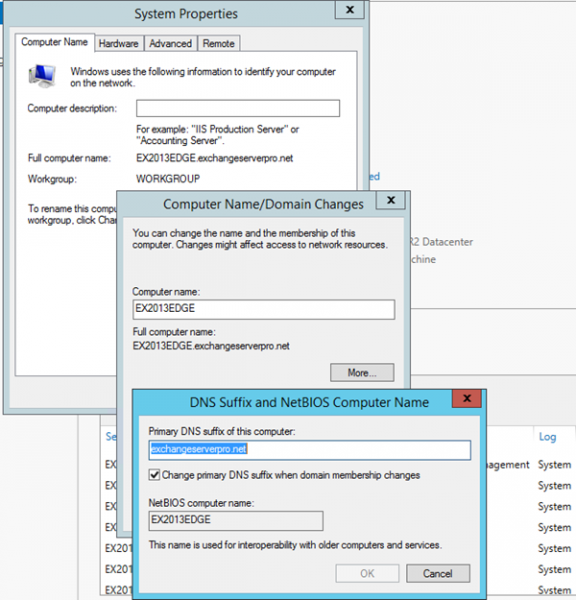
The server does not need to be a domain member.
There are two important DNS requirements:
- The Edge Transport server must be able to resolve the Mailbox server names in DNS. An easy way to achieve this is to point the DNS client configuration on the Edge server to your internal DNS servers (this may require opening a firewall port).
- The internal Mailbox servers must be able to resolve the Edge Transport server in DNS. You may need to manually register a DNS record on your internal DNS servers for this.
There are also some firewall ports to open:
- Port TCP 25 (SMTP) inbound/outbound between the internet and the Edge Transport server
- Port TCP 25 (SMTP) inbound/outbound between the Edge Transport server and the internal network
- Port TCP 50636 from the internal network to the Edge Transport server for EdgeSync
The only pre-requisite feature/role is the Active Directory Lightweight Directory Service.
PS C:\> Install-WindowsFeature ADLDS

Success Restart Needed Exit Code      Feature Result
------- -------------- ---------      --------------
True    No             Success        {Active Directory Lightweight Directory Se...

WARNING: To create a new AD LDS instance on server, log on to the destination server and then run the Active Directory
Lightweight Directory Services Setup Wizard. For more information, see http://go.microsoft.com/fwlink/?LinkId=224859.

Installing Exchange Server 2013 Edge Transport Role
Download the Exchange Server 2013 setup files (Service Pack 1 or later) to the server and run the following command from an elevated command prompt to perform the install.
C:Adminex2013cu5>setup /m:install /r:et /IAcceptExchangeServerLicenseTerms

Welcome to Microsoft Exchange Server 2013 Cumulative Update 5 Unattended Setup
Copying Files...
File copy complete. Setup will now collect additional information needed for
installation.
Languages
Management tools
Edge Transport Role

Performing Microsoft Exchange Server Prerequisite Check

    Configuring Prerequisites                                 COMPLETED
    Prerequisite Analysis                                     COMPLETED

Configuring Microsoft Exchange Server

    Preparing Setup                                           COMPLETED
    Stopping Services                                         COMPLETED
    Copying Exchange Files                                    COMPLETED
    Language Files                                            COMPLETED
    Restoring Services                                        COMPLETED
    Language Configuration                                    COMPLETED
    Exchange Management Tools                                 COMPLETED
    Edge Transport Role                                       COMPLETED
    Finalizing Setup                                          COMPLETED

The Exchange Server setup operation completed successfully.
Setup has made changes to operating system settings that require a reboot to
take effect. Please reboot this server prior to placing it into production.
A reboot is required after setup completes.
After installing the Edge Transport server you can configure an Edge Subscription to establish inbound and outbound mail flow.




Good afternoon everybody! I have a problem with exchange configuration. I do not know why we need to configure Edge Transport when we configure Mail exchange server 2013? Can you help me please?
You don’t need to configure an Edge Transport server. It is your choice whether to deploy an Edge Transport server or not.
This article equally applies to Exchange 2013
https://www.practical365.com/exchange-server/faq-exchange-server-2016-require-edge-transport-server/
Can we use Edge 2016 relay server
clients will send mails to HLB and HLB will forward the mails to EDGE who will forward the mails to internet?
we want to use this setup for bulk email where we do not want to use client connectivity as there is no mailbox.
is this possible?
very good work Paul , you are the best
Hi,
Is it possible to connect the external email clients and mobile devices to the Edge server ? or is it required to create an additional NAT and access rules for the internal Exchange client access servers ?
Clients don’t connect to the Edge Transport server at all.
I can’t find any instructions on adding more than one Edge server to an environment. So I’m not sure if you use the same .xml file from the first edge server on all mailbox servers, and then create a new .xml file from the 2nd edge server and apply that too all mailbox servers as well? Or is there another way? Thank you!
If you have multiple Edge servers you generate a XML file for each Edge server.
You only need to run the command to create the edge subscription for the AD Site once. You don’t need to re-run it on each Mailbox server. However if you later add or remove Mailbox servers, you should recreate the edge subscription (repeat the process basically).
Can a 2016 Edge server be installed in front of a 2013 exchange server?
Yes. Not sure why you wouldn’t just deploy 2013 Edge if you’re using 2013 internally though.
i have an edge server but i don’t know where it get connection, for the time being i provide from the server farm switch
Hello PAUL.We are receiving a ,ot of spam with attachmnets to users inbox from unknows senders.
We have exch 2013, with edge transport 2010 and EOP configured for filtering. What can be the issue here? Attachmnet encrypt user s files and folders when opened. pld advice.
Zero day ransomware attacks can defeat even the best anti-malware protection. But since you’re an EOP customer already, you should look at upgrading to Advanced Threat Protection as well, which can often detect zero day malware by using behavioral analysis.
You should also double check that attackers aren’t spamming your Exchange server directly. Make sure your firewall only allows inbound SMTP connections from the EOP IP address ranges.
Hi Paul,
Looking to possibly setup an Edge Transport in a DMZ. Do I need to use Windows Server or can I get away with Win7 Pro ?
Bob, check the system requirements for Exchange. It has the answer you seek.
what gateway must be used on edge server on the dmz point to internal firewall o point to the internet one. because the edge server must have a different ip addres and segment from internal one so when delivering email to internet using dns servers the server shoud know how to get to 8.8.8.8 for example trought the internet firewall.
does cas/mailbox server is the one that search in the edge for new incoming mail, or the edge after receive make a conection and delivery it to mailbox. if is the last the gateway is just needed the internet firewall and is just add a route to internal server pointin to dmz firewall ip address with de route add. in case the first then should multiple route should be added to the internal network to work route to cas/mailbox, route to dns servers AD.
I barely understand your question but I will try to answer it:
1. The Edge Transport server needs to be able to route to both the internet, and to the internal network
2. The firewall requirements for Edge Transport are mentioned in the article above and are also available on TechNet if you need clarification.
Pingback: Windows Server: “Install Exchange 2013 SP1 on Windows 2012 R2 Server Edition Part 1” | 0XY-nets
hi paul,
i have a problem about change ip address of my edge server in exchange server 2013?
i can’t find the document solve this. Can u help me make the listed i need to do, and some importan attention when i do this. thanks u.
Hi Paul,
We are a Exchange 2010 house and are planning to migrate to Office 365 over about 6-12mth.
So we are looking to run in Hybrid for quite a while.
We are looking to configure an Edge Transport Server in our DMZ on a standalone server as per your instructions. Can we use Exchange 2013 as an Edge Transport Server or do we have to stick with Exchange 2010?
Yes you can. TechNet has some guidance on running different versions of Edge alongside different versions of servers. But keep in mind that an Edge server is not required for Hybrid, it’s optional.
Hi Paul, do you have links to the TechNet articles?
Our IS policy restricts what we can expose to the public internet, so we have to go down the Edge server route.
https://technet.microsoft.com/en-us/library/bb232082(v=exchg.150)
Hi Paul,
we are running following environment for Exchange 2010 on premises.
3 Mailbox server with Single DAG
3 Hub/ CAS (multirole) with NLB
2 Edge Servers are used for routing email through Exchange Online Protection (EOP)
For Migration Purpose we have introduced following Exchange 2013 severs.
4 Mailbox + CAS (multirole) servers with Single DAG
3 Edge Servers
We have subscribed all three Exchange 2013 Mailbox servers with 2010 Edge Transport Servers and till now email flow is working fine after doing re-subscription because of Exchange 2013 introduction in the environment. Now, we want to subscribe 2013 Mailbox servers (one by one) with 2013 Edge Transport Servers so that 2010 and 2013 Edge Transport servers can route email to EOP and later we can remove Edge 2010 and Exchange 2010 from the environment.
we would like to know – while doing Edge Subscription will there be any issues with email routing? and can we do multiple subscription for Hub Transport 2010 and Mailbox 2013 servers, i.e with Edge 2010 and 2013 at same time?
please note our requirement is to keep Edge server 2013 in the environment and please note we have around 10k users base.
Thanks,
I, Questions,
Do I need a second Exchange 2013 lincense for a edge server and can I use only my GFI ME 2015 as a edge transport instead installing a new edge server?
Thanks
Every Exchange server you install requires a server license.
Edge Transport is an optional role. You can use other products for email security if you prefer.
Pingback: Installing Exchange 2013 | Lephunt
Hi Paul,
Very nice article!
I am having a problem installing Edge server on same server with other Exchange roles, I have CU 9 and when I try to install Edge it give back the error that it cannot be installed on same server with other Exchange 2013 server roles.
I have a very small organization with around 15-20 mailboxes, I really don’t see the point to have two servers only to exchange emails. Office 365 with Exchange is not so OK with our security reasons and an “in house” email server is the best solution.
What can be done ?
Thank you!
Edge Transport server can’t be installed on the same server as other roles. There’s no way around that.
Thank you!
Paul,
Awesome article. Thank you. I do have a question. We have an Exchange 3013 hybrid configuration with Office 365 and route our mail through EOP.
Most of our mailboxes are still on-premises. In the event that Office 365 went down, we would want to ensure that the business can continue to send and receive messages.
Would it be possible to build an Edge transport server, and not give it an edge subscription? I ask because we would want to use it as a fail safe in the event mail flow went down in Office 365.
Could we configure the edge subscription, and then change the mx record to route mail to our Edge transport server until Office 365 was restored?
I guess i’m asking if Exchange will be upset if we build an edge transport server with no edge subscription, and then turn it off so it isn’t being used until necessary. Does that make sense?
You don’t need an Edge Transport to receive email on-prem, you can just point your MX at your on-prem firewall and NAT the SMTP port (TCP 25) to your Exchange 2013 CAS.
My concern with your suggestion is that it complicates the response to an outage with lots of extra steps to perform against a half-implemented Edge server, and puts in place a solution that hasn’t been validated in your environment. What if the Edge subscription fails, or there’s a firewall issue, or a certificate issue, or something else goes wrong that you weren’t expecting?
If you’re going to deploy an Edge, deploy it in full. The Edge can be involved in Hybrid mail flow with Office 365 after all. But it isn’t mandatory.
Paul,
Thank you for the response sir. The main reason that we considered the Edge would be for the spam filtering that it offers.
Our concern would be that just moving the MX via the firewall would open us up to a lot of Spam.
In our situation, do you have a recommendation that would be better for us? the major concern is just ensuring mail flow, and decent spam filtering in the event Office 365 went down for an extended period of time.
Any recommendations are greatly appreciated. Thank you Paul.
Hi Paul,
Thanks for providing an excellent set of articles on Edge servers!
One question I can’t find answered anywhere, does an Exchange 2013 Edge Transport server require a full Exchange Server license (even though its not hosting any mailboxes) ?
Thanks
Simon.
Yes it requires a license. You would only need to buy a Standard Edition license for it though as there is nothing in Enterprise Edition that the Edge role needs.
Does the Edge Server require the same number of user CALs as does the transport server?
A user is a user. Other than that I can’t give you licensing advice. You should talk to your licensing provider to determine the number of CALs you need.
Hi Paul
I have just installed 4 2013 Edge servers as part of an upgrade from Exchange 2007 to 2013 and all seems to have gone well so far. The 2013 Edge severs are going though acceptance testing at the moment before they are put into production and we hav enoticed the following:
The “Microsoft Exchange Health Manager” service is set to “Automatic” but will not start and writes the following to the system log “The Microsoft Exchange Health Manager service depends on the following service: MSExchangeADTopology. This service might not be installed.”
Running the “Test-ServiceHealth” shows all the required services are running and obviously the MSExchangeADTopology service is not installed. So do you know if I can just set the “Health Manager” service to disabled or manual to get rid of the error in the system log?
Cheers
Andy
You’re probably seeing this issue:
http://jaapwesselius.com/2014/12/09/health-manager-does-not-start-on-exchange-2013-edge-transport-server/
Hi Paul
Yep that was the problem and that fixed it. Many Thanks.
Cheers
Andy
Hi Paul,
I recently installed an Edge Transport server for integration with O365. I am planing to upgrade my Exchange Environment from CU6 to CU8. Is there any thing special I need to do on the edge server for the upgrade.
Nothing special. However in your Exchange tools the Edge server will still appear as the lower version until you recreate the Edge subscription.
https://www.practical365.com/exchange-2010-edge-transport-faq/
(applies to 2013 as well)
perfect thank you!
Do you know for licensing . If we have 2 enterprise servers behind the firewall and then we implement the edge server outside the dmz does it also need to be Enterprise or will standard work ?
Thanks for the help !
The only difference between Standard and Enterprise is the number of mailbox databases it can host. Edge Transport doesn’t host any databases, therefore there is no benefit to using an Enterprise license for it. Standard will work fine.
Hi Paul,
Have you tried to configure the Hybrid Exchange with only Edge Transport?
Thanks.
No.
hi paul, in EAC, under servers > servers, when i click on our edge server and then click the edit button, i get ” An error occurred while accessing the registry on the server ” ServerName”. The error that occurred is: “Attempted to perform an unauthorized operation.”.
the edge server, in a standalone server and we have opened up the tcp 445, 135
remote registry is enable and working, is this ment to happen or is there something that i have missed?
What are you trying to configure?
Hi Paul I’M midst to implement exchange 2013.can you able to guide me.
Company has on-premise Exchange 2013 DAG and planning on go to Office 365 (EOP). Our out-bound SMTP traffic goes through our Cisco Virtual Email Security Appliance (aka, IronPort). Just to confirm, if setup the hybrid architecture, will mail flow not work through Cisco appliance? Will edge transport server be required?
Mail flow between Office 365 and your on-prem servers in a Hybrid configuration can’t go through a non-Exchange server/system.
It can go through an Edge Transport, but that is optional. You can still do Hybrid without Edge.
Your inbound/outbound email to the rest of the world can still go via the Ironport.
We have a similar configuration as Rocky does above, except with Exchange 2010 DAG + 3 CAS/Hub Transport servers in front. All Internet traffic goes through our Cisco Ironport. We are just starting our planning to move to O365 this year.
What would be the advantage of doing Hybrid with Exchange 2013 Edge Transport to handle traffic to/from MS O365?
For orgs that have a requirement that all SMTP connections must go through a DMZ, the Edge can fulfil that requirement.
Hello,
Does Edge transport server for Exchange 2013 work with Exchange 2010?
Thank you
Yes.
Paul, Is it normal practice to install the EDGE server and Exchange 2013 on the same server.. Are there any known issue If we do that.. We are upgrading to EX2013 from 2007 and previously we used a POPcon server on a separate box… Also I’m planing on Visualizing these systems..
The Edge server role for Exchange 2013 (or any previous version) can’t co-exist with other Exchange server roles on the same host.
Thanks Paul , So your saying dont have the Exchange server (CAS … ) running on the same esx host as the Edge transport ? Main issue im looking at it to have the EDGE transport isolated from the system like on its own DMZ ,,,
No I’m not referring to virtualization/hypervisor hosts. How you virtualize your servers is up to you, as long as you stay within the supported guidelines.
I’m referring to installing the Edge role on its own dedicated Windows server. It can’t co-exist on the same server with any other Exchange roles.
Paul,
i have a question and i hope that you can help me:
I am planning migrate Exchange 2010 to Exchange 2013, but i do not find information about the order of installation of the roles “Mailbox”, “Client Access” and “Edge” , i have three servers, a for each role, but the order of installation is important? if so then what is the order of installation?
Well, you should be deploying Exchange 2013 as a multi-role server, so both CAS and MBX will be installed at the same time anyway.
Edge can be deployed afterwards.
Thank you very much Paul!
But, the Enterprise in where i work required that install the CAS in a server and Mailbox in another server, in this case which should install first?
I would be challenging that since it is not the recommended practice.
Mailbox role is installed first.
Thank you Paul!
You got me out of trouble
Hi Paul!
I have a question:
I can access to the mailbox web manage without install the CAS?
Paul,
Does the Malware Agent work on the Edge Transport server role? Or is that agent only available on the MBX server roles?
Thanks,
Robert
The Malware Agent is not installed on Edge Transport servers.
Thanks Paul!!
I’ve read a lot of scenarios about installing exchange 2013 and there is no one of them is talking about Edge Transport. And when I install the exchange 2013 standard software there are only tow roles can be installed ( mailbox&client access). my question is, from where can I install the Edge Transport role , and can I install it in the same server with previous roles ( I have only 60 mail box ) , and finally is this role Optional or mandatory??
It is an optional role, introduced in Service Pack 1. If you don’t see it in setup then you’re installing a build that is older that Service Pack 1, which I do not recommend doing. The latest build at this time is Cumulative Update 6.
Dear Paul
Thanks for your response, thank you very much
yes I have installed the old version of exchange 2013 and then install the CU6 as update. I will try to complete the server settings with out installing Edge Transport since it is an optional role. I have some problems with SAN certificate and connection between exchange server and outlook. I’ll be back to ask for your help in these matters.
thanks for your cooperation
I hope we can use existing 2010 Edge transport role if we are upgrading to 2013 server. In this case installing 2013 Edge transport server is not needed. Correct me if I am wrong.
Yes you can use 2007 and 2010 Edge Transport servers with Exchange 2013. The steps are documented on TechNet.
Why the returning of the edge role?
Because some customers need it. Mentioned in this article:
https://www.practical365.com/exchange-server-2013-edge-transport-server/
Pingback: Exchange Server 2013 Edge Transport Server Role
This is probably a stupid question but I cannot find any documentation to definitively answer this.
We have a pure Exchange 2010 Org. We will be deploying Exchange 2013 Edge Transport servers now (ahead of our 2013 Org upgrade).
In this scenario is an AD schema update required? (I am assuming not but trying to make sure)
Good question. I’m not sure, and unfortunately don’t have an environment in which I could test that scenario.
However, if you did run into an issue creating the edge subscription you could fall back on manual mail flow config instead.
http://technet.microsoft.com/en-us/library/bb232082(v=exchg.150).aspx
Hello
fyi, i had no issue with edge sync between an Exchange 2010 SP3 Org and Exchange 2013 Edge without upgrading schema.
Rgds
Stef
Pingback: Installing Exchange 2013 Pre-Requisites on Windows Server 2012